Voy BMI calculator split form
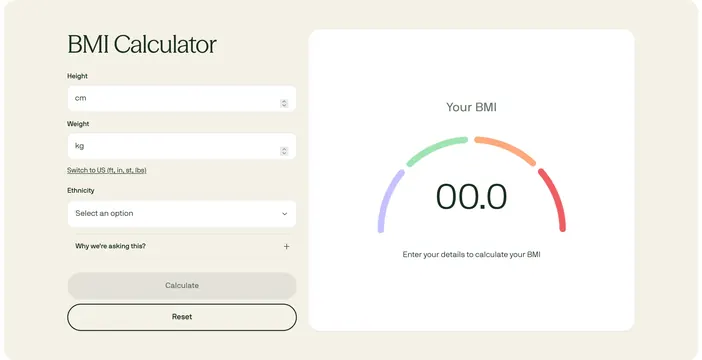
Two-column BMI calculator with metric inputs on the left and a semi-circular gauge result card on the right.
Summary
A soft-beige BMI tool pairing structured intake fields with a color-banded gauge visualization awaiting user input.
Visual description
Light cream background. Left column: serif headline "BMI Calculator," white rounded inputs for height (cm) and weight (kg) with steppers, underlined link to switch to US units, ethnicity dropdown, expandable gray box "Why we're asking this?" with plus icon, filled gray Calculate pill and outlined Reset pill. Right column: white rounded card titled "Your BMI" showing a four-segment semi-circular arc in purple, green, orange, and red with placeholder "00.0" centered and caption "Enter your details to calculate your BMI."
Key takeaway
The empty-state gauge teaches the output format before calculation, reducing anxiety about form submission. Pastel category colors make clinical data feel approachable.
Reuse notes
Works for health screening or eligibility tools. Ethnicity field implies regulated use; include clear rationale copy.
More like this
 Seed rigorous testing feature
 Grove six-benefit icon grid
 Good Life benefits list with thumbnails
 Voy medical leadership team grid
 Voy weight loss calculator with member stat
 Function available lab tests feature grid
 Routable vendor management features
 Paperclip identity bordered feature grid
 Routable tabbed AP feature walkthrough
 Slite Ask AI knowledge assistant
 Good Life quality testing feature list
 Function footer with newsletter signup
 Ro GLP-1 medication carousel
 Public home investing strategies feature carousel
 Public OTC stocks feature with logo grid
 Kajabi all-in-one platform nine-feature grid
 Jasper trust reasons bento grid
 Amigo core values list design
 Seed support FAQ accordion
 Atrium digital care phone mockup CTA
 Good Life verified testimonial carousel
 Sequence contract-to-billing hub diagram
 Good Life health guide article carousel
 Tenor onchain borrowing dashboard