Flame Bold variable width sliders
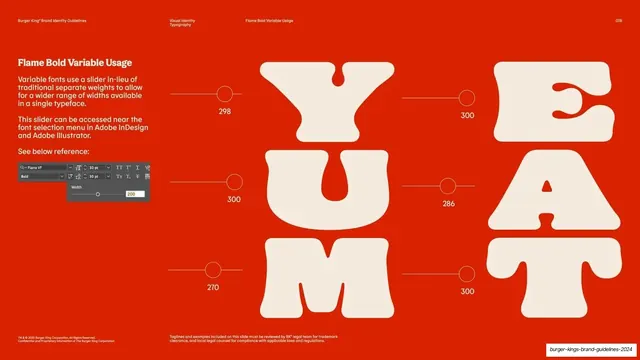
Red how-to slide pairing a width slider screenshot with six large capital letters set at specific variable width values.

Summary
A red how-to slide that pairs a width slider screenshot with six large cream capitals, each set at a specific variable width value.
Visual description
A left column holds the heading "Flame Bold Variable Usage", a paragraph on using the slider in InDesign and Illustrator, and a small app screenshot showing a Width field set to 200. The right side shows six cream capitals (Y, E, U, A, M and T) in a two-column arrangement. Each letter has a thin slider line with a round handle and a numeric value below it: 298, 300, 300, 286, 270 and 300.
Key takeaway
Showing each letter with its exact width value gives designers numbers they can reproduce, not just a visual impression.
Reuse notes
Use when a headline needs a specific width. The values are examples from this slide and apply to Flame Bold only. Confirm them in the installed font before reproducing them.
More like this
 Flame Bold variable capital letterforms
 Flame Bold Variable usage slider
 Spanish Nuevos masthead examples on yellow
 Colour split type spread
 Fork & Good curved wordmark on red
 Chapter divider for 1.0 Brand Overview
 Quick start guide intro statement
 The Open Application Network Brand Guidelines
 Alternative Airlines symbol, type construction and headline panels
 Zapier Brand Guide 2022
 YOTO AudioDynamics striped rooftop billboard
 Dare to Simplify manifesto slide
 Ziato Valentine greeting hero
 Before and after poster lockup comparison
 Five-step career plan from Erik Carter
 Numeral weight-progression specimen on orange
 SDG 5 gender goal and 2050 vision
 Textural evolution orange section opener
 Red question headline over halftone portrait
 Red theme light mid dark
 Two-column teal and coral before and after
 Optics and holography team photo
 Red theme, light to dark variants
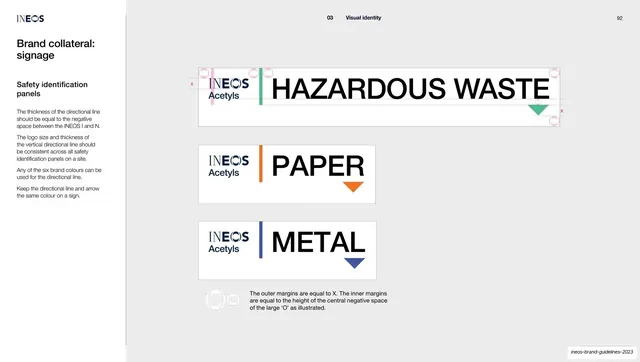 Safety identification panel layout rules